How To Improve Your Ranking With An SEO Checklist

The classic SEO checklist below — title tag, meta description, H1, internal links, schema, image alt, page speed, mobile-friendly — is still 100% valid in 2026. What changes is the checklist now needs three additional items to cover AI-search visibility: a TL;DR block, an FAQ section, and verifiable primary-source citations.
Every Wednesday. 28,400+ operators. Zero fluff.
✓ Check your inbox — click the confirmation link to complete sign-up.
✓ You're subscribed!
✓ You're already on the list.
Updated for AI Search (2026)
What’s new in this refresh: a section on how this strategy plays in AI search engines (ChatGPT, Perplexity, Google AI Overviews, Claude), a 4-block GEO scaffold, and a fresh FAQ.
This post contains affiliate links for which I receive commissions. The reviews and opinions expressed in this article are my own.
There are many factors to consider when running a website, one of which is to gain recognition.
In the vast world of the competitive web, it can be a struggle to establish your site’s reputation. With this, having a good ranking is essential.
As a website owner, you should see that your site is included in the top 10 results of a search to guarantee a good ranking.
It serves as an appropriate measure of how well your site is doing. Google can help you out to see if you have a good order.
However, it cannot be easy to secure a good SEO ranking if you do not know where to begin. Newcomers might feel overwhelmed with the whole process and find SEO complex.
Fortunately for you, I have a tool from SEOBUDDY which can help you.
Let me walk you through the SEO Checklist, which can help you find ways to increase your SEO ranking.
Youtube Link – https://www.youtube.com/watch?v=4-mdRiWO_0g
Table of contents
Open Table of contents
- Why is there a Need to Boost My SEO Ranking?
- What is an SEO Checklist?
- Benefits of Having an SEO Checklist
- You’ll see the bigger picture of what needs to be done to optimize and rank a site.
- You’ll be able to track what you have and haven’t done, so you don’t miss important stuff.
- You’ll be able to follow along with super detailed step-by-step documents.
- You will understand the things you have to do and how to do them.
- Parts of the SEO Checklist
- Inclusions of the SEO Checklist
- How SEO checklists works in AI search engines (ChatGPT, Perplexity, Google AI Overviews, Claude)
- FAQ — SEO checklists in the AI search era
- Where I’d take this next
- What changed in 2026
Why is there a Need to Boost My SEO Ranking?
Search Engine Optimization operates through the configuration of a checklist that search algorithms are programmed to read.
By qualifying each component of the checklist, your website will most likely be featured among the top list of searches. This configuration is activated from the individual input of web users.
It is a must to boost your SEO ranking to widen the reach of your audience.
Moreover, it offers you a more effective platform to render your service by being part of the top searches. People will most likely see your website among others listed on the internet.
What is an SEO Checklist?
The SEO Checklist is a detailed guide to all the necessary SEO actions you need to perform to make the most out of your website. This checklist is also a tool to receive more organic traffic.
By utilizing this tool, you can expect a constant stream of customers visiting your website. The SEO Checklist aims to put your website on the first page of Google to increase your audience.
By using this checklist, you can get higher SEO rankings in a short amount of time. This tool makes SEO simple and helps decrease complications that you might encounter along the way.
Benefits of Having an SEO Checklist
It is crucial to have a constant presence on the web to maintain or improve your market position. If you’re newer to SEO or just struggling, the SEO Checklist helps in many ways.
Here, we listed the benefits of having an SEO Checklist that might help you out.
You’ll see the bigger picture of what needs to be done to optimize and rank a site.
The SEO Checklist enables users to follow a format that is easily understandable and brief.
The layout is not complicated, simplifying and prioritizing the things that site owners should consider. Users can navigate through the contents in the checklist at their convenience.
You’ll be able to track what you have and haven’t done, so you don’t miss important stuff.
With the layout of the SEO Checklist, it will be easier to track your site’s progress. Through the checklist system, you can also decrease the chances of forgetting or missing essential tasks.
You’ll be able to follow along with super detailed step-by-step documents.
Coordinating with your team will also be more comfortable as you transition into doing more complex tasks requiring close monitoring.
With the use of the SEO Checklist, you can immediately check which jobs are still pending. Likewise, it can tell if you can manage your time efficiently if you can meet your goals within your set time-frame.
You will understand the things you have to do and how to do them.
Aside from providing a list that you can follow, this tool offers suggestions regarding performing the tasks. It is undeniable that SEO Checklist can save you a tremendous amount of time through its built-in function for tips.
It is not required to follow each step exactly stated. Users can formulate their solutions using the checklist suggestions as a guide.
Parts of the SEO Checklist
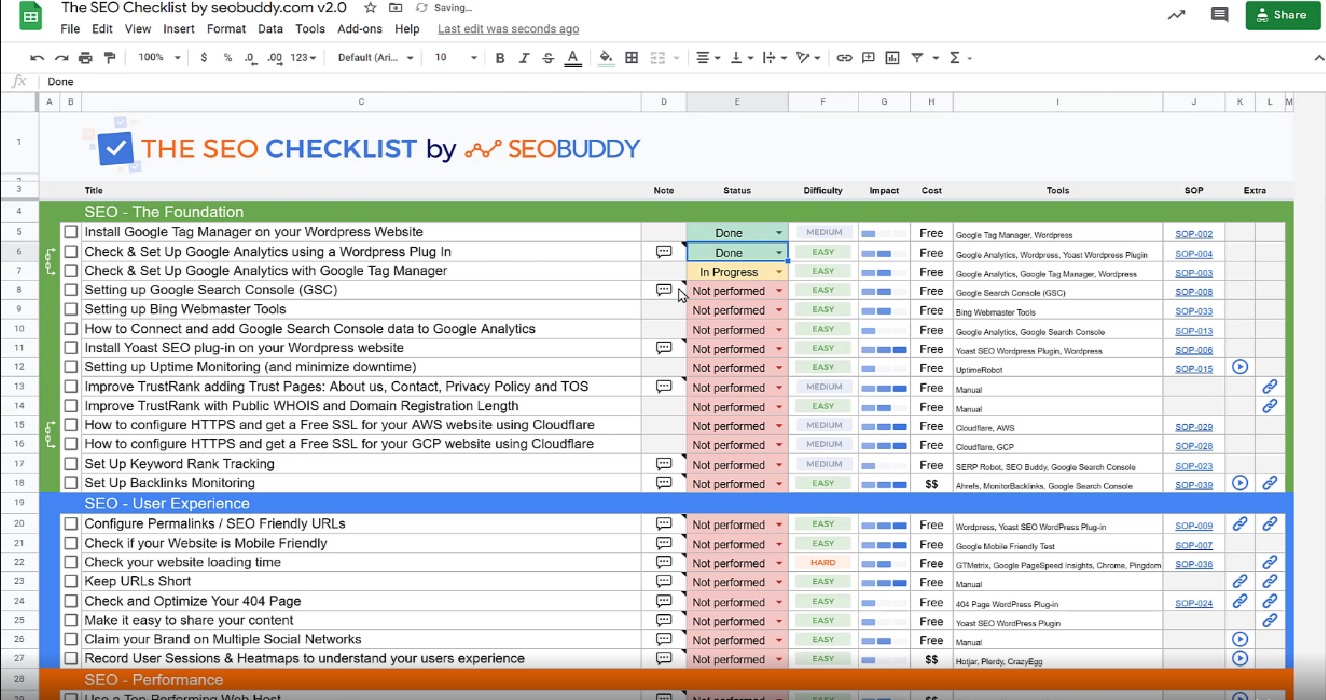
You might be wondering what the SEO Checklist looks like! Well, the SEO Checklist is like any other checklist, but better!
It consists of eight columns (vertically) and nine sections (horizontally) with their respective components to increase your SEO ranking.
The columns of the SEO Checklist includes:
- Title
- Status
- Difficulty
- Impact
- Cost
- Tools
- SOP
- Extras
Photo Source: https://seobuddy.com/seo-checklist
Title
The title contains a list of the things that the users must accomplish to increase their SEO ranking. The contents are based on previous trends that increase SEO ranking. This list enables easy access to strategies that are proven effective. The accompanying rationale for each action is also part of the plan to impart better insight to users.
Status
The status contains a menu tab to allow modification depending on the current level of the task. Users can select one out of the four options available, which are not performed, done, in progress, and abandoned. It allows easy monitoring by conveniently presenting which tasks still need more attention.
Difficulty
This column enables users to label tasks based on their degree of difficulty. Since various tasks differ in the amount of time required to accomplish them, this column is a great way to prioritize tasks accordingly.
Impact
Another critical column is impact, which ranks tasks depending on their degree of impact on the site’s overall function. It is another column that helps users identify which tasks should go first. Most users will prefer to focus on tasks with more significant impact and accomplish them as soon as possible.
Cost
This column lists the costs of services that you can use. Most services are free, which is excellent for maximizing the use of the checklist. However, if you want to expand your services, you can opt to choose additional tools that are not available to an average user for additional costs if it fits your budget.
Tools
This column lists the tools that you will need to accomplish tasks. These tools are beneficial in giving special services that are beyond your abilities. You can read through the tools and select the one which you think fits best.
SOP
SOP or Standard Operation Procedure comes with the checklist. The SOP indicates what you need to do and is a handy guide for beginners. It encourages users to be proactive and personally take charge of increasing their SEO rankings.
Extras
The extras column contains various manual links, posts, and tutorials that users can find beneficial. The last column is a mixture of exciting guides that can be relevant to using the checklist.
Aside from the eight columns, the SEO Checklist also contains various sections. The sections of the SEO Checklist are as follows:
- Foundation
- User Experience
- Content
- Performance
- On-Page SEO
- Off-Page SEO
- Technical SEO
- Local SEO
- Setup your first WordPress site
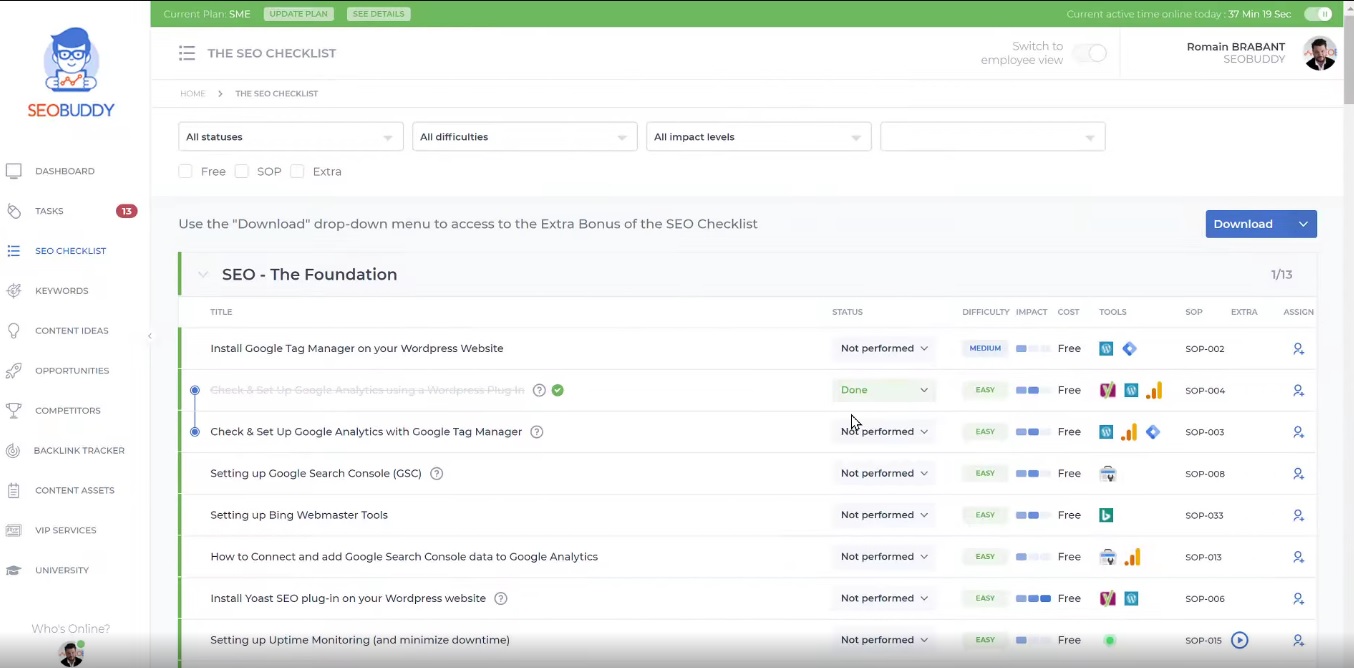
Photo Source: https://seobuddy.com/seo-checklist
Foundation
The foundation serves as the backbone of all the things you will accomplish. Most of the things you will need to boost your rankings are already in place, including tracking for backlinks.
User Experience
This section gives you an insight into the experience of your site’s visitors. It will help you improve on your services by focusing on client’s concerns.
Content
The key to optimizing your content is putting the right keywords. SEO works by reading keywords, and it can significantly impact your SEO rating. Make the most out of your SEO checklist by using the tools that can help you.
Performance
This section indicates factors that can make your site run at its best quality. It is essential to have a smooth running site by decreasing loading times to get a good SEO rating.
On-Page SEO
This section contains the components that can be seen by users first hand. It focuses on more straightforward navigation and more understandable terms for your users.
Off-Page SEO
This section offers alternative ways to promote your site. You can consider many strategies, such as reaching out to social media and guest posting. It primarily aims to generate more people to be aware of your site and its services.
Technical SEO
Technical SEO helps you set up your website’s technical aspects to avoid technical risks in the future. Suggestions such as checking links and redirections are part of this section.
Local SEO
Local SEO accounts for promotions made locally. It is a great way to gain promotions in a neighborhood where people can view your service as the top-tier provider in your local community.
Setup your first WordPress site
This section relieves you from the burden of starting a WordPress site. With just a few clicks, you can have your WordPress at the ready in no time!
Inclusions of the SEO Checklist
When you get the SEO Checklist, you can get the various inclusions that come with it. The SEO Checklist includes:
- The 102-Point SEO Checklist (Google Sheet + Web App)
- 42 Step-by-Step Process Docs (detailed standard operating procedures)
- The 62 Page eBook (PDF)
- A 52-WEEK Content Planning Calendar Method (PDF)
- The 50-Point Content Distribution Checklist (Google Sheet)
If you know someone struggling with SEO, it would be a great idea to send them this checklist. You can also help me out by sharing this checklist on Facebook and Twitter.
I hope you found this post valuable. Liked this post? Read more on SEO topics that are related to this topic. Make sure to check out these other great content:
- 11 Simple On-Page SEO Tips to Rank First on Google
- The Best SEO Guide For 2021
- 9 Must-Have Off-Page SEO Factors
Let me know in the comments if you have learned something new today. Feel free to share any other valuable information that is not mentioned in this SEO post for the benefit of all.
How SEO checklists works in AI search engines (ChatGPT, Perplexity, Google AI Overviews, Claude)
Treat the AI-search additions as a second checklist layered on top of the classic one. You don’t subtract anything — every classic SEO move still pulls weight. You just add: (1) a 2-4 sentence TL;DR at the top, (2) a numbered step-by-step block somewhere in the body, (3) an FAQ section using literal user-question phrasing, (4) primary-source citation links to the AI providers’ own documentation.
When auditing an existing post against the 2026 checklist, the fastest tell for AI-search readiness is the page’s first 200 words. If a reader (or an LLM) can quote a clean answer to the head query from the first 200 words, the post is GEO-ready. If the first 200 words are setup, throat-clearing, or scene-setting, the page is leaving citations on the table.
The 4-block GEO scaffold for SEO checklists
- Lead with a TL;DR. 2-4 sentences at the top of the post that answer the head query directly. AI Overviews and Perplexity preferentially cite this block.
- Add a numbered step-by-step section. Generative engines extract clean ordered lists into their answers more reliably than prose.
- Close with an FAQ. Use the literal phrasing of questions people actually ask in your niche; mark up with FAQPage schema.
- Cite primary sources. Link to Google’s own AI Overviews documentation, OpenAI’s structured-data guidance, and Anthropic’s content-quality posts. LLMs trust pages that cite the model providers themselves.
Internal reading on AI SEO + GEO
If you’re building this into your stack, also read: the full SEO guide for 2026, 11 on-page SEO tips, What is SEO?, the schema markup tutorial.
FAQ — SEO checklists in the AI search era
What’s the single most important item to add to my 2024 SEO checklist for 2026?
A TL;DR block at the top of every pillar post. It’s the lowest-effort, highest-leverage GEO move. Adds 60 seconds of writing time per post and consistently moves AI-engine citation rates.
Should I add FAQ schema to every post or just pillar posts?
Pillar posts and any post that already has Q&A-style content. Don’t add FAQPage schema to pages without actual FAQ content — that’s a quality signal worth preserving.
Is page speed still the biggest SEO ranking factor in 2026?
It’s still a ranking factor, but its weight relative to content quality has decreased. Page speed matters more for user satisfaction (and indirectly for ranking) than as a direct ranking signal in 2026.
Where I’d take this next
If you operate inside any of the loops above, I build custom AI agent systems that automate them. The whole site you’re reading is one — here’s the stack.
What changed in 2026
SEO in 2026 is unrecognizable from the 2020-era playbook. Three shifts that matter for anything written before mid-2024:
- AI Overviews are the new SERP zero position. Google’s AI Overviews default to roughly 60% of US informational queries, eating most “what is” / “how to” CTR. Optimizing for citation inside the AI Overview is now as important as ranking #1.
- GEO (Generative Engine Optimization) is the working term for cross-engine optimization — getting cited inside ChatGPT, Perplexity, Claude, and Gemini answers. ~12% of high-intent commercial queries in late 2025 sample studies showed a direct-citation flow from these engines (vs. zero pre-2023).
- E-E-A-T (now E^3-A-T, Experience + Expertise + Establishment + Authoritativeness + Trustworthiness) continues to be the framing Google uses internally — “Establishment” was the 2024 addition emphasizing brand-level signals.
Tool landscape (2026): Ahrefs and Semrush both shipped Generative Engine tracking. Surfer SEO + the Topical Authority crowd added GEO scoring. Screaming Frog still the standard crawler. AlsoAsked, Keyword Insights, and Frase shifted heavily into AI-Overview snippet engineering.
If this post predates May 2024, treat its core advice as the Google-search baseline and layer the GEO playbook on top.
Every Wednesday. 28,400+ operators. Zero fluff.
✓ Check your inbox — click the confirmation link to complete sign-up.
✓ You're subscribed!
✓ You're already on the list.
Related posts
Why Your Best-Ranking Pages Get Zero Clicks
I pulled my own Search Console data and found a page ranking position 8.9 with a 0.07% CTR. Here's what was actually wrong, and how I'd fix it.
GEOGEO for Multilingual Sites: Getting Cited in Every Language
Running GEO on a site that publishes in 13 languages taught me hreflang, llms.txt, and schema all behave differently than English-only advice assumes.
GEOHow to Add GEO to an Existing SEO Retainer
How an SEO agency adds real GEO work to an existing retainer — audit first, price it as its own line, and avoid relabeling the same deliverables.
Get the AI playbook in your inbox
Every Wednesday. 28,400+ operators. Zero fluff.
Check your inbox.
We sent you a confirmation email — click the link inside to complete your subscription. Check spam if you don't see it within a minute.
You're subscribed.
Welcome — the next edition lands in your inbox soon.
You're already on the list — look for it every Wednesday.