How to Create Search Engine Friendly Tags

The on-page tags that matter for SEO — title, meta description, H1, image alt, internal links — still matter in 2026. The structural metadata that matters for AI search is a slightly different set: schema markup, OpenGraph, Article meta, canonical URLs, language tags.
Every Wednesday. 28,400+ operators. Zero fluff.
✓ Check your inbox — click the confirmation link to complete sign-up.
✓ You're subscribed!
✓ You're already on the list.
Updated for AI Search (2026)
What’s new in this refresh: a section on how this strategy plays in AI search engines (ChatGPT, Perplexity, Google AI Overviews, Claude), a 4-block GEO scaffold, and a fresh FAQ.
Bottom line
One of the essential Search Engine Optimization (SEO) ranking elements is the title tag. It helps you bring more organic traffic to your website and enhance your results if you use appropriately created search engine-friendly headlines.
However, you must ensure that your titles are appropriately optimized to achieve excellent SEO results. Hence, they must target the appropriate keywords while enticing the reader to click on your page.
It’s not hard to write them if you adopt a set of best practices, and the benefits of the results may be considerable!
In SEO, titles are one of the most significant factors. However, having your keywords in the title is a no-brainer, and writing SEO-friendly title tags isn’t always simple.
If there’s one thing I’ve learned from many years of SEO work, it’s that users tend to overlook titles.
I have come across statements that there isn’t any visible success despite working with an SEO firm. In this case, it appears that the said “firm” hasn’t even optimized it as simple as the title tag.
Hence, to help you save the trouble, I’ve put up this guide of information you need to know and my recommended practices to ensure that every one of your site’s pages has well-optimized titles.
Table of contents
Open Table of contents
- What is Search Engine Optimization (SEO)?
- What is SEO Friendly Title Tags?
- H1 Tag vs. Title Tag
- Importance of Search Engine
- Tips on Writing a Search Engine Friendly Title Tags
- Properly Optimized Title Tags Can Save Your Engagements
- How SEO-friendly tags and metadata works in AI search engines (ChatGPT, Perplexity, Google AI Overviews, Claude)
- FAQ — SEO-friendly tags and metadata in the AI search era
- Where I’d take this next
- What changed in 2026
What is Search Engine Optimization (SEO)?
To fully comprehend SEO-friendly title tags, let us first define SEO.
When you utilize a search engine, SEO, or Search Engine Optimization, it describes the logic that affects how websites are ranked (such as Google).
In a nutshell, SEO is a digital marketing technique for increasing the amount and quality of visitors to your website.
What is SEO Friendly Title Tags?
You may believe that the title tag is the language you type into WordPress or whatever platform you’re using to reflect the title of your page or post.
On the other hand, a title tag is an HTML element that describes a blog article or page’s title.
Additionally, a search-engine-friendly title tag describes the content of a webpage and is optimized for search engines.
As a result, when generating title tags, your objective should be to make them as relevant and precise as possible and offer a suitable summary of the content of a page.
H1 Tag vs. Title Tag
The Title Tag is abbreviated as “title” in HTML, whereas the H1 Tag is abbreviated as “h1.” Although page titles and H1 tags both serve the same purpose of providing additional information about the content of a website page, there is a significant distinction between the two.
Here’s a more specific significant distinction between the two:
H1 Tag
An H1 tag is the huge text heading that shows on a webpage. When people come to your website, this is the first thing they will notice. The H1 element displays just on the webpage; it does not appear in search engine result pages.
Title Tags
The title tags are the first few words shown on search engine result pages. It’s what gets people to click from a search engine to a website where they can read the content.
The default title for bookmarked pages is the title tag. Please keep in mind that Title Tags are not visible on the real website page.
Importance of Search Engine
The first thing that needs to be done on your to-do list should be title tag optimization for on-page SEO. For two key reasons, title tags are crucial for SEO:
- The title tag appears in search results, so users will see it even before visiting your website.
- It offers search engines a good idea of what the page is about.
As a result, this combination makes title tag optimization a critical step in the whole SEO process. It will help your page or post gain more interactions than before optimizing your title tags.
Tips on Writing a Search Engine Friendly Title Tags
Before we get into crafting your SEO-friendly title tags, let’s look at some of the best practices you should consider to get better results.
1. Title Length
Using an optimum title length is one of the most vital elements of SEO-friendly titles.
The first 50 to 60 characters of a title tag are frequently displayed by Google. Although there are no strict rules, keeping your titles brief and appealing is a good idea.
Therefore, keeping your titles to 60 characters or less is a good idea. If your titles are under 60 characters, you should anticipate roughly 90% of them to appear correctly in Google search results.
Additionally, because characters might vary in width, there is no specific character limit.
But what will happen if you have a title tag that is too long? Google will shorten them and append at the end. This is referred to as truncation.
2. Unique Title Tags
Uniqueness is crucial when optimizing your articles, headlines, and content to receive more traffic from search engines like Google.
Yes, there will be a lot of duplicate titles for identical content in Google search results. However, if you want to improve your rankings, you must produce original and highly entertaining titles.
It would help if you strived to write title tags that appeal to search engine algorithms and human users. Moreover, ensure your page names are appropriate, as Google crawlers may become confused if you utilize irrelevant page titles.
3. Avoid Using Stop Words
Stop words are not processed by search engines like Google. These words are the most frequent terms that most search engines avoid. This is frequently done to reduce room and quicken the crawling or scanning of massive amounts of data.
Here’s a summary of some of the many sorts of stop words to avoid in title tags if you’re curious.
- A
- And
- But
- So
- On
- Or
- The
- Was
- With
If you’re wondering how will it look like in your next title, here’s an example for you:
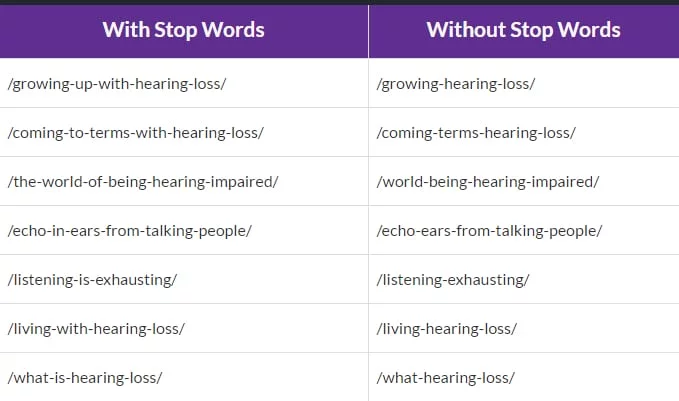
Image source: Online media master
4. A Title That is an Accurate Description of Your Content
Consider the title to be a very brief overview of the page. A good title is extremely related to the page’s content.
Don’t deceive search engines by using a title that doesn’t match the content.
Because of what is known as pogo-sticking, this is a terrible SEO strategy that may kill your rankings. As a result, Google will lower your rankings, causing your engagements to deteriorate.
Pogo sticking is the phrase for when a person searches for something on Google, clicks on one of the top results, views a website but doesn’t find it amusing, then returns to the search results and clicks on the second item, and so on.
5. Keywords Should be in Titles or The Beginning
The keywords that are at the beginning are valued more highly by Google. Users will click more on the results that contain the terms they just looked for, which will increase the number of clicks.
However, you won’t always include the target keyword with the highest search traffic right away. Since getting within a title while sounding decent and natural is difficult.
Google is capable of deducing the topic of an article, but you must provide it with some helpful tips. It will figure out easier and reward you if you offer useful tips.
Create Engaging Headlines
You need to write headlines that attract users’ attention and lead to spontaneous hits from search engines like Google.
The three most important criteria to consider while creating click-worthy names are as follows:
- Benefit
- Curiosity
- Emotion
Let’s go over each one and see some examples.
1. Benefit
You’ll get incredible results if you start displaying advantages in your title tags. Here’s what it looks like in a title:
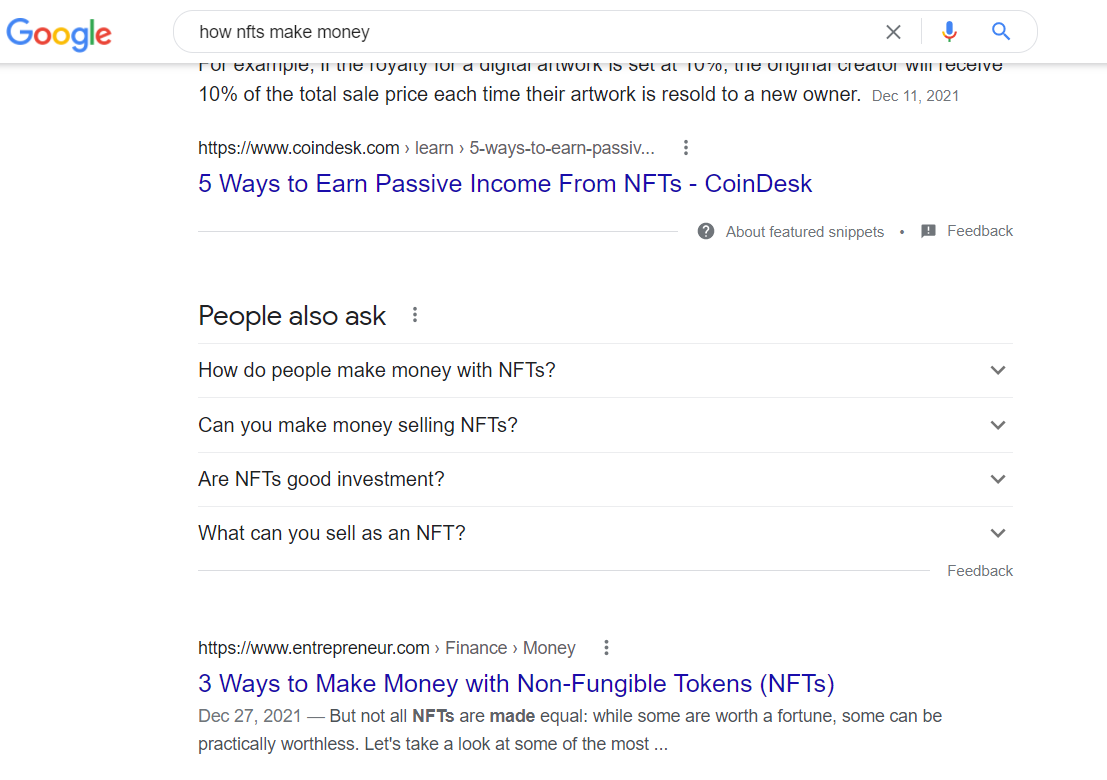
2. Curiosity
To maximize organic clicks, you need to build interest in your titles. Here’s an example for you:
3. Emotion
Users love to visit sites online wherein they can relate to emotionally. Through this, users will visit your page and what you have in store for them.
To help you, here’s what it looks like:

Properly Optimized Title Tags Can Save Your Engagements
Title tags are significant since they educate readers about the content available when they click on a link. They’re crucial to search engines for the same reason, except that they also help assess the relevance of a web page as a consequence of a search query.
They aren’t difficult to master; they need a little time and effort. These will never be perfect. As a result, you should strive to test and enhance your title tags regularly. You may also run split tests to discover which title works best if you have enough traffic.
If you liked reading this blog, here are other scripts you might enjoy:
- 9 Must-Have Off-Page SEO Factors
- How to Improve Your Ranking With An SEO Checklist
- How to Increase your Traffic to 250k/mo (Beginner to Advanced)
How SEO-friendly tags and metadata works in AI search engines (ChatGPT, Perplexity, Google AI Overviews, Claude)
AI engines parse three layers of metadata when evaluating a page: HTML tags (title, meta description), social tags (OpenGraph, Twitter cards), and structured data (JSON-LD schema). Each layer feeds a different part of the engine’s understanding. The classic on-page tags drive how Google indexes the page; the structured-data layer drives how AI engines extract answers from it.
Practical 2026 move: every pillar post should have a complete OpenGraph tag set (title, description, image, type), Article schema with author + dates + main entity, and either FAQPage or HowTo schema where applicable. That metadata trifecta is what separates AI-engine-citable pages from invisible-to-AI pages structurally.
The 4-block GEO scaffold for SEO-friendly tags and metadata
- Lead with a TL;DR. 2-4 sentences at the top of the post that answer the head query directly. AI Overviews and Perplexity preferentially cite this block.
- Add a numbered step-by-step section. Generative engines extract clean ordered lists into their answers more reliably than prose.
- Close with an FAQ. Use the literal phrasing of questions people actually ask in your niche; mark up with FAQPage schema.
- Cite primary sources. Link to Google’s own AI Overviews documentation, OpenAI’s structured-data guidance, and Anthropic’s content-quality posts. LLMs trust pages that cite the model providers themselves.
Internal reading on AI SEO + GEO
If you’re building this into your stack, also read: 11 on-page SEO tips, the schema markup tutorial, the full SEO guide for 2026.
FAQ — SEO-friendly tags and metadata in the AI search era
Are HTML title tags still the most important SEO element in 2026?
For classic Google ranking, yes — still one of the highest-weighted on-page signals. For AI-engine citations, schema markup and TL;DR content matter at least as much.
Do meta descriptions matter for AI search?
Indirectly — AI engines read them to understand page topic, but rarely cite them verbatim. The TL;DR block at the top of the page body matters more for actual citation extraction.
Should I update OpenGraph tags on old posts in 2026?
If they’re missing, yes — adds AI-engine readability. If present and accurate, leave them alone.
Where I’d take this next
If you operate inside any of the loops above, I build custom AI agent systems that automate them. The whole site you’re reading is one — here’s the stack.
What changed in 2026
The 2026 search-engine leaderboard has rearranged meaningfully:
Statcounter global, Q1 2026. ChatGPT Search hit measurable share for the first time in late 2024 and continues climbing.
For non-Western markets the picture differs: Yandex remains dominant in Russia / CIS (~65% share); Baidu owns China (~60% share, with Bing as a notable challenger at ~15%). Reverse-image search now has a real native answer inside ChatGPT (image upload + “find this”) and Perplexity — the third-party tools described in older posts are increasingly redundant for most use cases.
Every Wednesday. 28,400+ operators. Zero fluff.
✓ Check your inbox — click the confirmation link to complete sign-up.
✓ You're subscribed!
✓ You're already on the list.
Related posts
Why Your Best-Ranking Pages Get Zero Clicks
I pulled my own Search Console data and found a page ranking position 8.9 with a 0.07% CTR. Here's what was actually wrong, and how I'd fix it.
GEOGEO for Multilingual Sites: Getting Cited in Every Language
Running GEO on a site that publishes in 13 languages taught me hreflang, llms.txt, and schema all behave differently than English-only advice assumes.
GEOHow to Add GEO to an Existing SEO Retainer
How an SEO agency adds real GEO work to an existing retainer — audit first, price it as its own line, and avoid relabeling the same deliverables.
Get the AI playbook in your inbox
Every Wednesday. 28,400+ operators. Zero fluff.
Check your inbox.
We sent you a confirmation email — click the link inside to complete your subscription. Check spam if you don't see it within a minute.
You're subscribed.
Welcome — the next edition lands in your inbox soon.
You're already on the list — look for it every Wednesday.