Ubersuggest Review: A Must-Have Free Keyword Research Tool

Ubersuggest is a budget-friendly keyword research tool that’s been a starter option for years. In 2026 it’s added basic AI Overview tracking but lags the dedicated AI-search tools.
Every Wednesday. 28,400+ operators. Zero fluff.
✓ Check your inbox — click the confirmation link to complete sign-up.
✓ You're subscribed!
✓ You're already on the list.
Updated for AI Search (2026)
Tool features and pricing change frequently; this refresh adds an FAQ on how the tool fits a 2026 GEO workflow without modifying the protected feature and pricing sections below.
Ubersuggest review
While implementing a growth strategy for my website, I make sure that all my articles attract a lot of visitors.
With that in mind, I had to think of a way for me to learn which topics I should write about that would keep my visitor count high.
As of today, I have armed myself with lots of SEO tools in order to keep me in the loop for the best topics while crunching the numbers of how visible my website is. Like in a previous article, I talked about WhatsMySERP, a free rank tracker.
In this article, I want to talk about Ubersuggest, a free SEO tool that can help you generate new keyword ideas.
If you want a summary of what I will discuss in this article, you can watch the video below:
Table of contents
Open Table of contents
- Ubersuggest’s features
- Keyword Overview
- Keyword Ideas
- SERP Analysis
- Traffic Analyzer
- SEO Analyzer
- How to use Ubersuggest
- Ubersuggest vs. Others
- Ahrefs
- SEMRush
- keywordtool.io
- WhatsMySERP
- Payment Method
- License Use
- Customer Support
- Ubersuggest at a Glance
- Ubersuggest in a 2026 AI-search workflow — FAQ
- Where I’d take this next
- What changed in 2026
Ubersuggest’s features
Ubersuggest started under Neil Patel. He proceeded to create a tool that would help fellow website owners have a catalog of possible keywords whose data came from Google Suggest. I will talk about some of the key features of Ubersuggest here.
Keyword Overview
This feature is what made this tool well-known and is its central feature.
It generates a report based on the word or phrase you entered into its search bar.
The first part looks like this, using “freelancing” as an example keyword below:
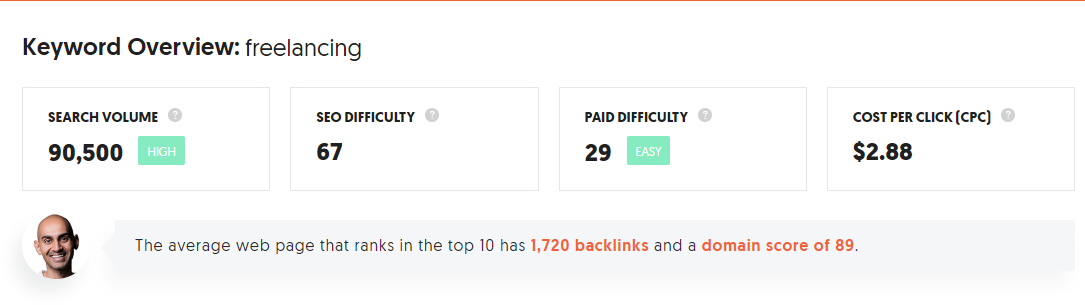
Search volume is the number of times this exact keyword will be searched in a month. The higher the number here means there is a big audience that reads articles that has this specified keyword in it.
SEO difficulty
SEO difficulty is an estimate of how competitive it is to rank for this keyword. The lower the number, the easier for an article written around this keyword to appear in the first page of organic search results.
Paid difficulty
Unlike SEO difficulty, paid difficulty is an estimate based on how easy it is to rank in paid search results. The higher the number, the harder it is to appear on the first page of search results as a paid search result.
Cost per click (CPC)
Cost per click (CPC) is the average cost you would have to pay Google if you want to add an article of this keyword as an advertisement. The higher amount here means that the keyword is more valuable.
The next section of the report looks like this and it is a chart of how many searches of this keyword has been made over the past months:

After that, the graph breaks down how much of the traffic did click on SEO results. It also lists the age demographic of those who looked this keyword up. You can hover on each bar to know the exact number who did.

After that section, you can also see a list of articles, their titles, their number of daily visitors, the number of backlinks, and the number of shares on Facebook and Pinterest. This list can help you get an idea of what to write next.

Keyword Ideas
This feature shows possible keywords based on the word or phrase you entered into Ubersuggest.
This data is revealed through a table. On default, it is set on “suggestions” or keywords that are related to this keyword.
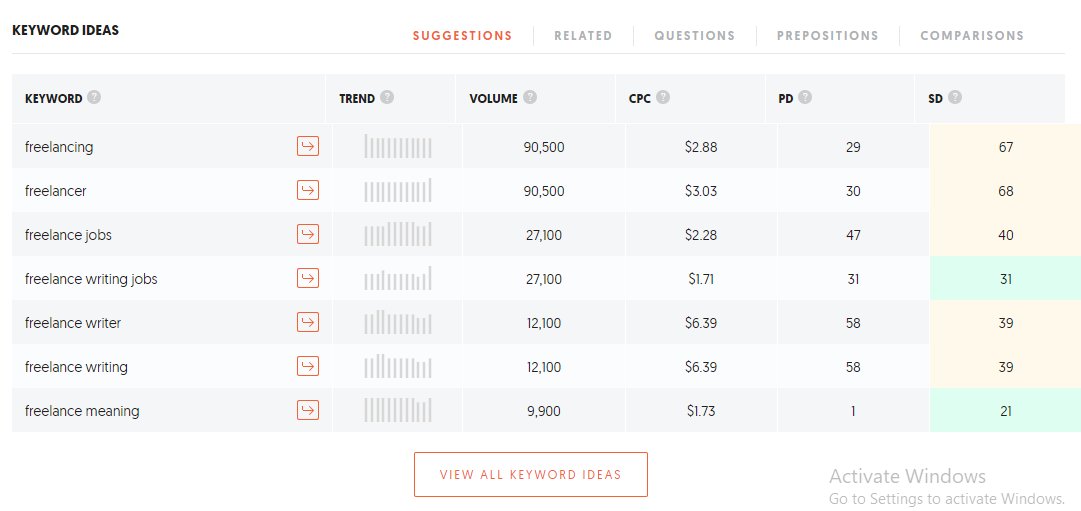
The next tab, “Related,” lists keywords that are related to the word or phrase you searched in Ubersuggest.
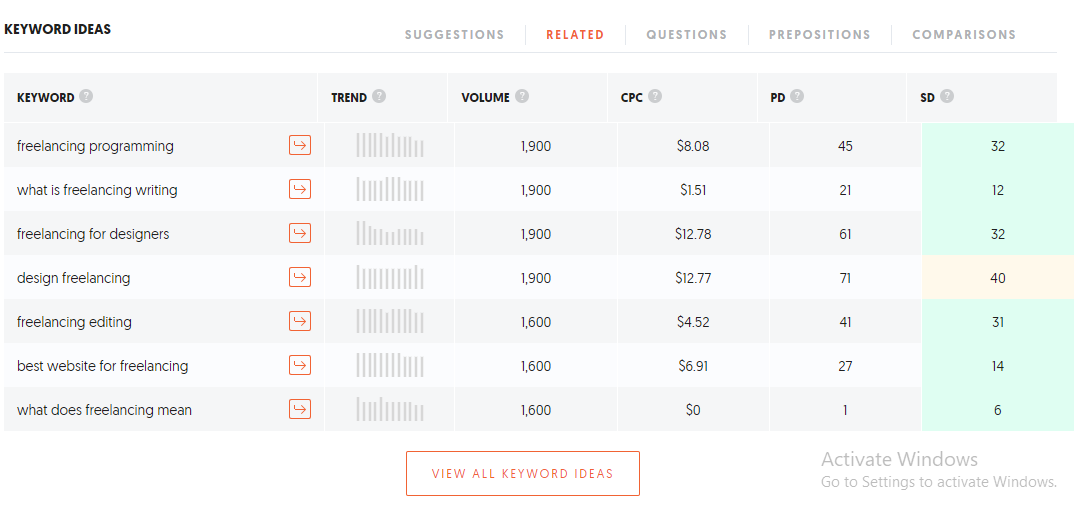
For the “Questions” tab, it has something to do with the most searched questions that are associated with the word or phrase you entered into Ubersuggest.
For “Prepositions,” these are keywords that have two related concepts in one search term.

Lastly, “Comparisons” are all search terms with the keyword that includes phrases such as “vs,” “or,” or “and.”
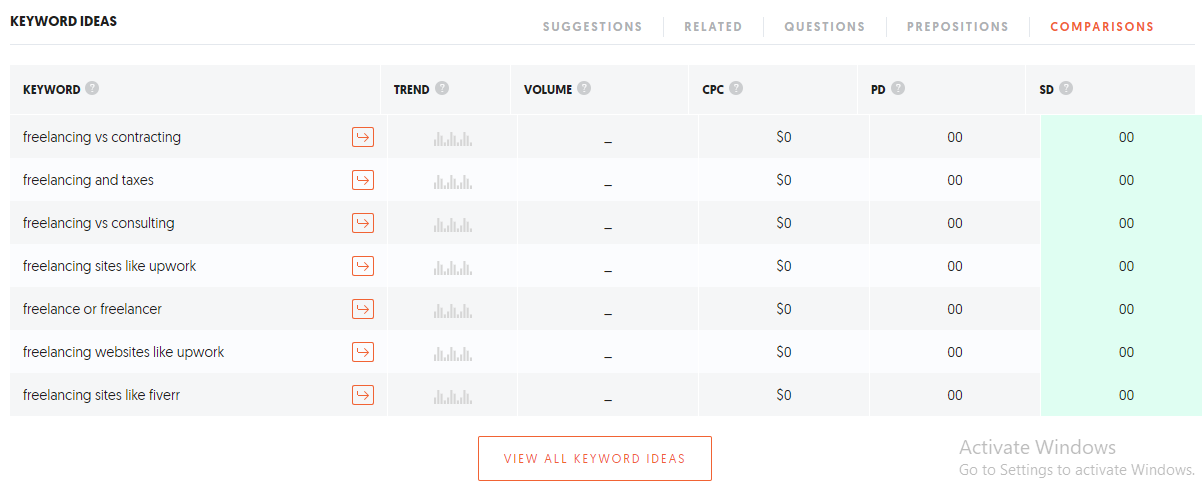
For each entry in any of the tables above, they show CPC, volume, paid difficulty (PD), and SEO difficulty (SD). The trend column refers to how much traffic each entry was looked up in a search engine.
SERP Analysis
Clicking on the arrow beside any entry under the Keyword Ideas section will list down the top websites that have the keyword in it in order based on the number of visits, the number of backlinks, domain score, and social media shares.

The Google SERP column refers to the top 100 sites ranked from top to bottom.
Next to it is the estimated visits column. It refers to how much traffic it receives on a monthly basis.
This is followed by the links column, which is the number of links present inside the article.
The domain score (DS) column is a score from 1 to 100 that is based on how authoritative it is and how high its rank is on Google.
Finally, the last column is the total number of times the article has been shared on social media platforms.
Relevant: You would also like to read here my review of WhatsMySERP which is a free rank tracker
Traffic Analyzer
For this section, you can enter any domain and you can learn information about the domain.
After entering any website in the provided search bar, it will show these four numbers at the start.
The first entry labeled as Organic Keywords refers to the number of keywords this domain has ranked for in organic searches.
This is followed by Ubersuggest’s estimate of the number of visitors the domain gets, known as Organic Monthly Traffic, based on the number of keywords it has ranked in.
After the domain score, the last entry in the picture above is the number of other domains that have linked to this article with the label Backlinks. The insert below it labeled as NoFollow is the number of those domains that do not work anymore.
This chart shows how much traffic the website has garnered over the past months. The chart after this now refers to the number of keywords used within the domain that has ranked between 1 to 100.
The table that follows after this is a list of the pages that have garnered the most visits, backlinks, and social media shares throughout the domain. You can also view the number of visits per country as well.
The last section of this feature now ranks which keywords attracted the most visitors, its rank in the organic search results, and the estimated number of future visitors, which also includes how many of those visitors came from which country.
When you click any of the orange arrows beside any of the entries of the table, you would be given a detailed report of the entry as a keyword similar to the one shown in Keyword Overview.

Ubersuggest shows a detailed list of how popular the keyword is and which other domains have ranked for this search phrase.
SEO Analyzer
This is the final part of Ubersuggest’s features. It focuses on how well a domain or website has been performing based on Google’s data. There are two parts to this: Site Audit and Backlinks.
Site Audit
This module lets you enter your own website or a competitor’s into its search bar and it will generate a detailed report.
The first four details at the top of the page are as follows:
- On-page SEO score – overall SEO score between 0 to 100 of all the websites inside the domain based on the ratio of issues found by this module’s audit tools
- Organic monthly traffic – total estimated traffic this domain gets over organic search results
- Organic keywords – number of keywords found that this domain ranks in organic search results
- Backlinks – number of other domains that link back to any of this domain’s websites
The next part of the report focuses on the following things:
- Health check :This part of the report gives an overview of how many pages were found by Ubersuggest’s own robot crawler. It then lists which page is healthy, broken, has issues, redirects, or blocked.
- Critical errors: This part of the report gives the total number of errors that need the help of a webmaster to correct. You can learn a detailed report of these errors by clicking “View All” to be redirected to a list of problems needed fixing.
- Warnings: This part of the report points out the number of minor issues with the specified domain. They may have little to no impact on the domain’s SEO health and are one of the easiest to correct.
- Recommendations: These errors have the smallest priority amongst all the errors in this report and may be easy to correct.
The next part, entitled Site Speed, refers to how fast would a visitor be able to navigate to the domain or website. It also indicates the score for each criterion:
- First contentful paint – time when the first image or image is shown on the page
- Speed index – time when the entire page is filled with content
- Time to interactive – time when the user can navigate seamlessly on the page
- First meaningful paint – time when the primary content of a page is visible
- First CPU idle – time when the page is ready to handle input from the visitor
- Estimated input latency – the time of how fast the page will respond to visitor input during the busiest window of page load
Finally, the last part of Ubersuggest’s Site Audit explains the list of the top SEO issues found within the specified domain.
Backlinks
The final part of Ubersuggest lists the number of other domains that link back to one of the sites listed under this domain.
At the beginning of this report, it also lists the number of unique domains that have linked backed to this website in one of their pages.
The next chart lists the growth of websites that site this domain and the type of domain they are located.
The chart after that lists the number of dofollow and nofollow links that have been made per day that have something to do with any page within this domain.
The last item on this report refers to the exact list of articles that have referenced the domain in some way. Any item that has the NF symbol means that it will not influence the domain’s ranking in search results.
How to use Ubersuggest
One can use Ubersuggest for free by going directly to the application here. Once it loads, you will be presented with this page:

You can use the application as is by entering a domain or a keyword in the indicated search bar and navigating to each of the pages.
However, you can only access the full data after logging in using a valid Google account. Without opting for a monthly or yearly fee for the application, using a Google account would only let someone work on one project and save a few keyword data.
Ubersuggest vs. Others
Ahrefs
Ahrefs and Ubersuggest share the same features when it comes to keyword searching, domain ranking, and topic suggestions. Their main difference lies in the fact that these features can only be accessible after paying for a monthly or yearly fee with Ahrefs.
SEMRush
Another tool that is similar to Ahrefs, SEMRush can help you with your keyword research and domain ranking. However, it features a module that keeps track of their advertising efforts, including one for social media. If you want to know more about the features and benefits of using SEMRush, read my review here
keywordtool.io
This tool pulls out possible autocomplete suggestions from various sources such as Google, Youtube, Amazon, Bing, and eBay. Unlike Ubersuggest, they only focus solely on keyword research.
WhatsMySERP
Similar to keywordtool.io, WhatsMySERP can be used to regularly check on keyword ranking based on lots of factors, including the type of device used to search on. Unlike Ubersuggest, all its features are accessible for free.
Payment Method
If you are interested in using Ubersuggest as your SEO tool, you can opt to pay for its use for a month or for an entire year for a fixed fee in your local currency. They accept payments through major credit cards and debit cards.
During the time you have paid for its use, you are allowed to cancel one’s account or downgrade to a free one at any time. They also offer a 30-day, no-questions-asked money back guarantee as well.
License Use
I’m Kind of a Big Deal, the company managing Ubersuggest, allows its user to download information from Ubersuggest’s website but it must not be used for a deceptive message in any form.
Aside from that, its license does not allow the user to upload or download files that contain any copyrighted material to and from the application as well.
Customer Support
You can contact support regarding the application by sending a message through neil@neilpatel.com. For cancellation of the subscription, you can also opt to send them a message using the following:
I’m Kind of a Big Deal, LLC
ATTN: Termination
3750 Las Vegas Blvd. S. #3108
Las Vegas, NV 89158
Ubersuggest at a Glance
In short, Ubersuggest is a tool that can help you look for possible keywords and topics to rank in. Aside from that, it can also check your site and point out which errors should be fixed.
This is one of the many tools that can help your website grow both in content depth but also in the number of visitors as well. You can do this either by signing with one Google account for your website or pay a subscription to manage all your projects at once.
Did you like my review of Ubersuggest? Take a look at these articles to help you arm your website on the path of search engine discovery:
- BlueHost Review: one of the top Web Hosting Solutions
- ClickFunnels Review: Is it worth the hype?
- 5 top Content Marketing Trends to Boost Your website Traffic in 2020
Share your thoughts about Ubersuggest in the comments below!
Ubersuggest in a 2026 AI-search workflow — FAQ
Note: this update adds context on how Ubersuggest fits into AI-search work. The platform features, pricing, and competitor comparisons in the body above are intentionally left unmodified — those change too frequently for an automated refresh to handle reliably. Verify those details on the vendor site before relying on them.
Is Ubersuggest enough for AI search optimization in 2026?
For starter-level keyword research, yes. For serious AI-search visibility tracking, no — pair with Profound, Athena, or manual sampling.
Has Neil Patel’s Ubersuggest improved meaningfully since 2023?
Incremental improvements — better data accuracy, AI Overview flags. Still behind the SEMrush/Ahrefs tier on depth and accuracy.
What’s the best free alternative to Ubersuggest in 2026?
Google Search Console + Google Keyword Planner (free with a Google Ads account) cover most starter needs. Ubersuggest’s free tier is more usable but increasingly limited.
Related reading: the best SEO tools, the complete keyword research guide, the full SEO guide for 2026.
Where I’d take this next
If you operate inside any of the loops above, I build custom AI agent systems that automate them. The whole site you’re reading is one — here’s the stack.
What changed in 2026
SEO in 2026 is unrecognizable from the 2020-era playbook. Three shifts that matter for anything written before mid-2024:
- AI Overviews are the new SERP zero position. Google’s AI Overviews default to roughly 60% of US informational queries, eating most “what is” / “how to” CTR. Optimizing for citation inside the AI Overview is now as important as ranking #1.
- GEO (Generative Engine Optimization) is the working term for cross-engine optimization — getting cited inside ChatGPT, Perplexity, Claude, and Gemini answers. ~12% of high-intent commercial queries in late 2025 sample studies showed a direct-citation flow from these engines (vs. zero pre-2023).
- E-E-A-T (now E^3-A-T, Experience + Expertise + Establishment + Authoritativeness + Trustworthiness) continues to be the framing Google uses internally — “Establishment” was the 2024 addition emphasizing brand-level signals.
Tool landscape (2026): Ahrefs and Semrush both shipped Generative Engine tracking. Surfer SEO + the Topical Authority crowd added GEO scoring. Screaming Frog still the standard crawler. AlsoAsked, Keyword Insights, and Frase shifted heavily into AI-Overview snippet engineering.
If this post predates May 2024, treat its core advice as the Google-search baseline and layer the GEO playbook on top.
Every Wednesday. 28,400+ operators. Zero fluff.
✓ Check your inbox — click the confirmation link to complete sign-up.
✓ You're subscribed!
✓ You're already on the list.
Related posts
Why Your Best-Ranking Pages Get Zero Clicks
I pulled my own Search Console data and found a page ranking position 8.9 with a 0.07% CTR. Here's what was actually wrong, and how I'd fix it.
GEOGEO for Multilingual Sites: Getting Cited in Every Language
Running GEO on a site that publishes in 13 languages taught me hreflang, llms.txt, and schema all behave differently than English-only advice assumes.
GEOHow to Add GEO to an Existing SEO Retainer
How an SEO agency adds real GEO work to an existing retainer — audit first, price it as its own line, and avoid relabeling the same deliverables.
Get the AI playbook in your inbox
Every Wednesday. 28,400+ operators. Zero fluff.
Check your inbox.
We sent you a confirmation email — click the link inside to complete your subscription. Check spam if you don't see it within a minute.
You're subscribed.
Welcome — the next edition lands in your inbox soon.
You're already on the list — look for it every Wednesday.