What Is SERP And How Does It Work? A Closer Look

The classic 10-blue-link SERP is no longer the only result page Google shows. In 2026 the SERP is a layered surface: organic results sit underneath an AI Overview, sometimes a People-Also-Ask, sometimes a Featured Snippet — and adjacent engines like Perplexity and ChatGPT have their own answer surfaces.
Every Wednesday. 28,400+ operators. Zero fluff.
✓ Check your inbox — click the confirmation link to complete sign-up.
✓ You're subscribed!
✓ You're already on the list.
Updated for AI Search (2026)
What’s new in this refresh: a section on how this strategy plays in AI search engines (ChatGPT, Perplexity, Google AI Overviews, Claude), a 4-block GEO scaffold, and a fresh FAQ.
The process of searching for an item on google, then Google displaying appropriate results is extremely fascinating.
Google is one of the top search engines on the internet. In the digital age, information is just one click away.
Google receives over 63,000 searches every day. Meaning, search engines process a huge amount of information.
On an average, a person will do research 3 to 4 times a day. That’s a lot!
I am always fascinated by how Google manages to provide results to every search query. Explore this topic by reading this article.
Table of contents
Open Table of contents
What is SERP?
What is the meaning of SERP? This acronym stands for Search Engine Results Page. It is the process of how search engines respond to the search queries of internet users. It is like the intelligence behind search results.
The following are SERP features:
- Organic research results
- Paid results
- Featured Snippets
- Knowledge Graphs
- Video Results
Search Engine Results Page basically provides possible results to every keyword searched. Keywords play an important role in SERP for it will be utilized to analyze what results to display.
Keywords serve as links to results. The search engine will tend to display results based on the words typed by users and displaying what is most relevant. In terms of displaying the results, you will understand the relevance of SERP features in providing search results. Read further to explore more about SERP.
What happens when we search?
When we search for information on the internet, search engines read it as keywords. All pages that are viewed as relevant to the keywords are identified and indexed. Search engine algorithms rank the pages into sets of results.
Search engines use the following relevant data in order to rank results:
- Location
- Detected language
- Search history
- Device
There are search engines that rely on the location in order to process data. Location is relevant for searches that require it such as searches relevant to directions. This will give results relevant to the location of the user. For example, the search results for users in a certain country will be most likely to be displayed first as the local results. Meaning, the items displayed by SERP can be found within the locality of the user.
In detected language, if the user’s language can be detected, search engines can display results related to the language. Same is the case with location – ,displayed results will be related items pertaining to the detected language.
Search engines also use search history to generate results. For example, if the user frequently searches for a certain topic, search engines are more likely to generate results based on the frequently searched topic. Furthermore, search history creates a trend which is analyzed by SERP to display the possible preference of the user.
Search engines also generate results based on the device used by the users. A set of results is created based on the device used to search the query. For example, search results in iOS may be different from the search results in Android devices and even personal computers. It is relevant for SERP in order to generate accurate results as possible.
Relevant: Learning keyword research
Search Engine Results Page (SERP) Anatomy
The SERP might not be a big deal to some internet users, but this is an important topic to discuss in digital marketing. As defined, SERP is the process where search engines display search results. This process happens in an instant. To further understand SERP, take a look at its anatomy. It will provide insights on where to find a specific part of SERP and understand its functions.
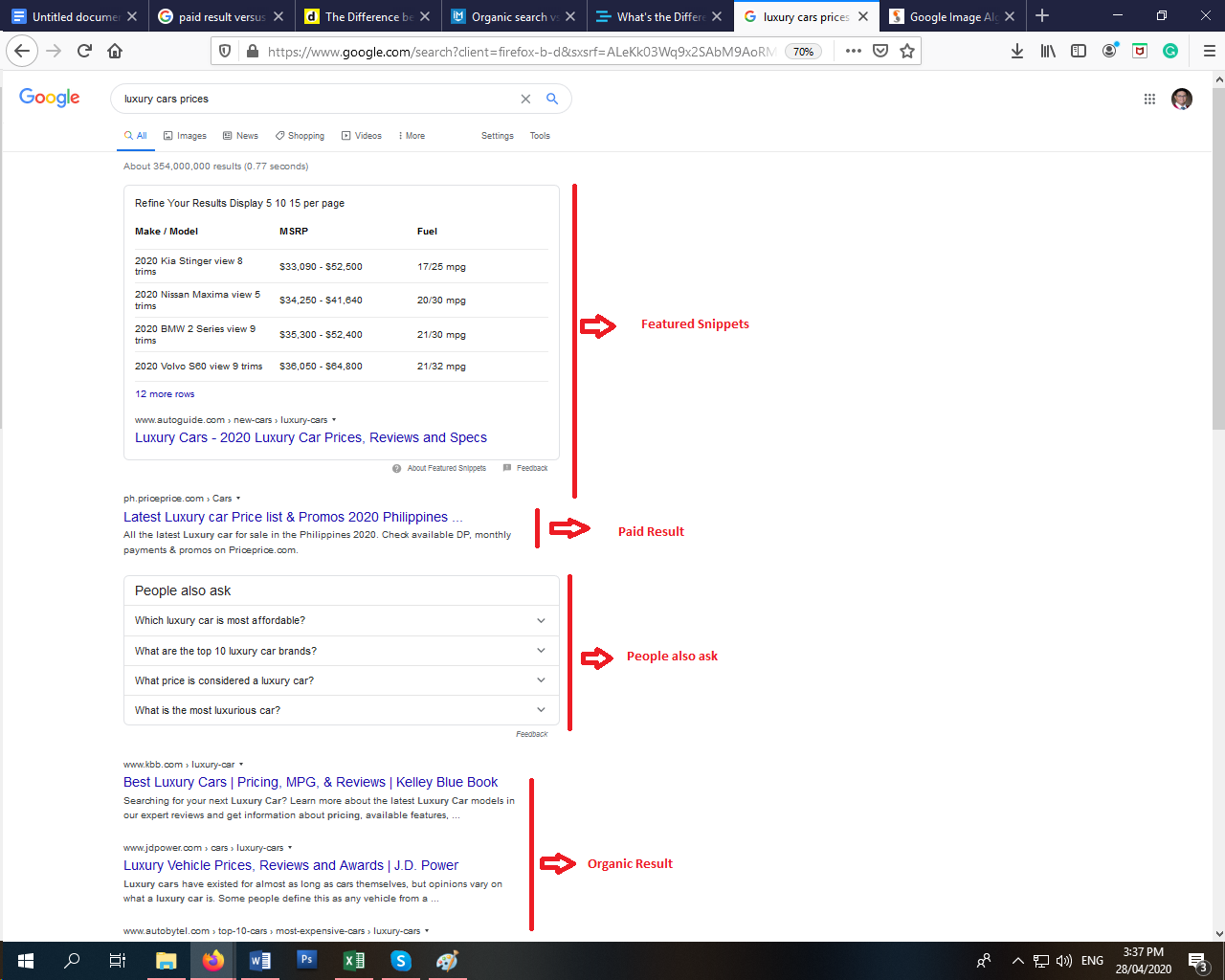
The top part of the results page, the uppermost result is where the featured snippets are displayed as search results. Next, is the paid result. Next to the paid results are the frequently asked questions or ‘people also ask’ portion. Then, follows the organic result.
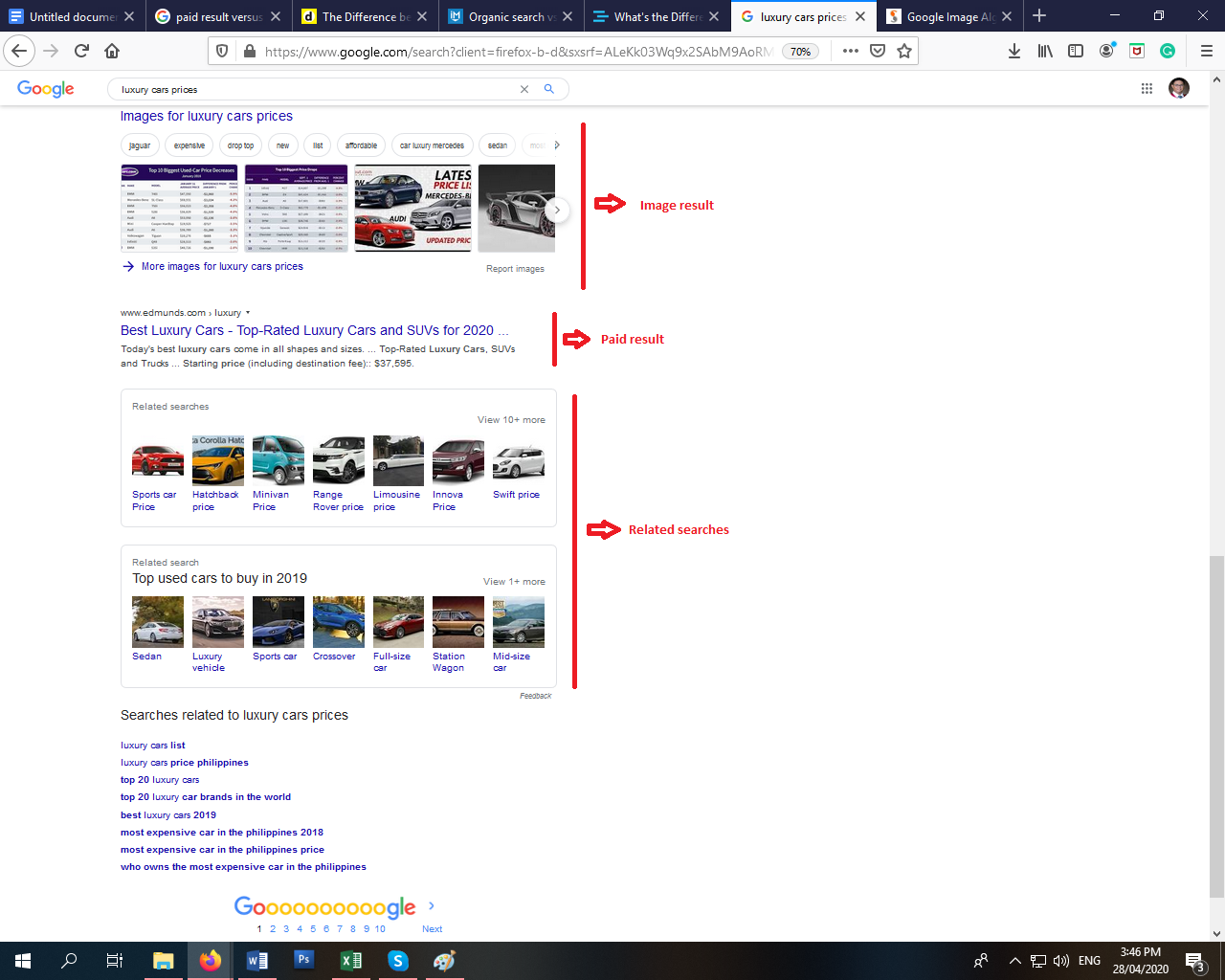
The middle and the bottom part of the page result are divided into the following: image result, another paid result, and related searches. As observed, paid results can also be displayed at the bottom of the page prior to related searches.
Search results: A closer look

Google has different categories in displaying results. These are the paid and organic results. These two have different classifications and conditions in order to gain the top spot of the search results.
Basically, paid research results are advertisements. These are paid by website owners to make their websites appear in certain keywords searches.
In other terms, companies pay Google or any other search engines in order to appear in search results. You can spot these results through its markings. Search engines give them a shaded background, a yellow ad marking, borderlines, and other visual hints.
Many users may not notice that paid results are actually advertisements. Even though it has a mark indicating that it is an advertisement, it appears to be native in the search results. As a result of this, the advertisement can gain an advantage to clicks compared with other search results.
Website owners and companies pay for this chance to appear in Google search results instead of developing their SEO where it takes time to build. Paid searches are an alternative to organic searches.
Paid results also may appear at the bottom of the page. With this, organic research is crowded with paid results.
On the other hand, organic results are natural search results. They are located below the paid results. Rooting from the word organic, these results are generated from the search engine algorithm referring to frequently searched keywords.
Organic results or natural results filter results based on its relevance to the keywords. Earning a high rank in organic results boosts authority and credibility for website owners. That is why there are companies that invest in increasing its search rankings.
Organic results usually take a small portion of the results page compared to the results for paid ads. When using small-display devices, organic results may be limited to one or two results.
In a realistic sense, it takes a long time for website owners to build their search rankings. Website owners usually do not wait that long in order to achieve higher conversions. Time is a crucial factor, especially in digital marketing.
On the opposite, If website owners are after a cost-efficient increase in search rankings, organic results are the best option. Website owners may utilize readily available tools or hire people to boost their search rankings.
Hence, paid or organic results are displayed according to its relevance with the searched terms. Those two search results can be considered as essential.
Featured snippets
Featured snippets are also called answer boxes displayed on search results. These are the short answers given by search engines directly in the search results. In other terms, they provide immediate answers directly displayed in the search results.
For example, if you are looking for information about “paid search results”, search engines display a featured snippet at the top of search results. Featured snippets provide answers to the query asked in the search engine. The search engine displays quick relevant information based on the keywords searched.
What is the relevance of featured snippets in SERP? As SERP displays featured snippets, 8.6% of clicks go to it. It means that featured snippets earn the attention of traffic compared with other organic search results. This means a lot in digital marketing.
Featured Snippets appear in different forms. Following are some examples:
1. Numbered list

Search engines will display numbered snippets if the user’s query implies looking for steps. In the example above, the user is trying to look for ideas on how to start a business. A numbered list featured snippet is included in the search result. Link is also provided where users can click to explore more on the presented ideas.
2. Paragraph
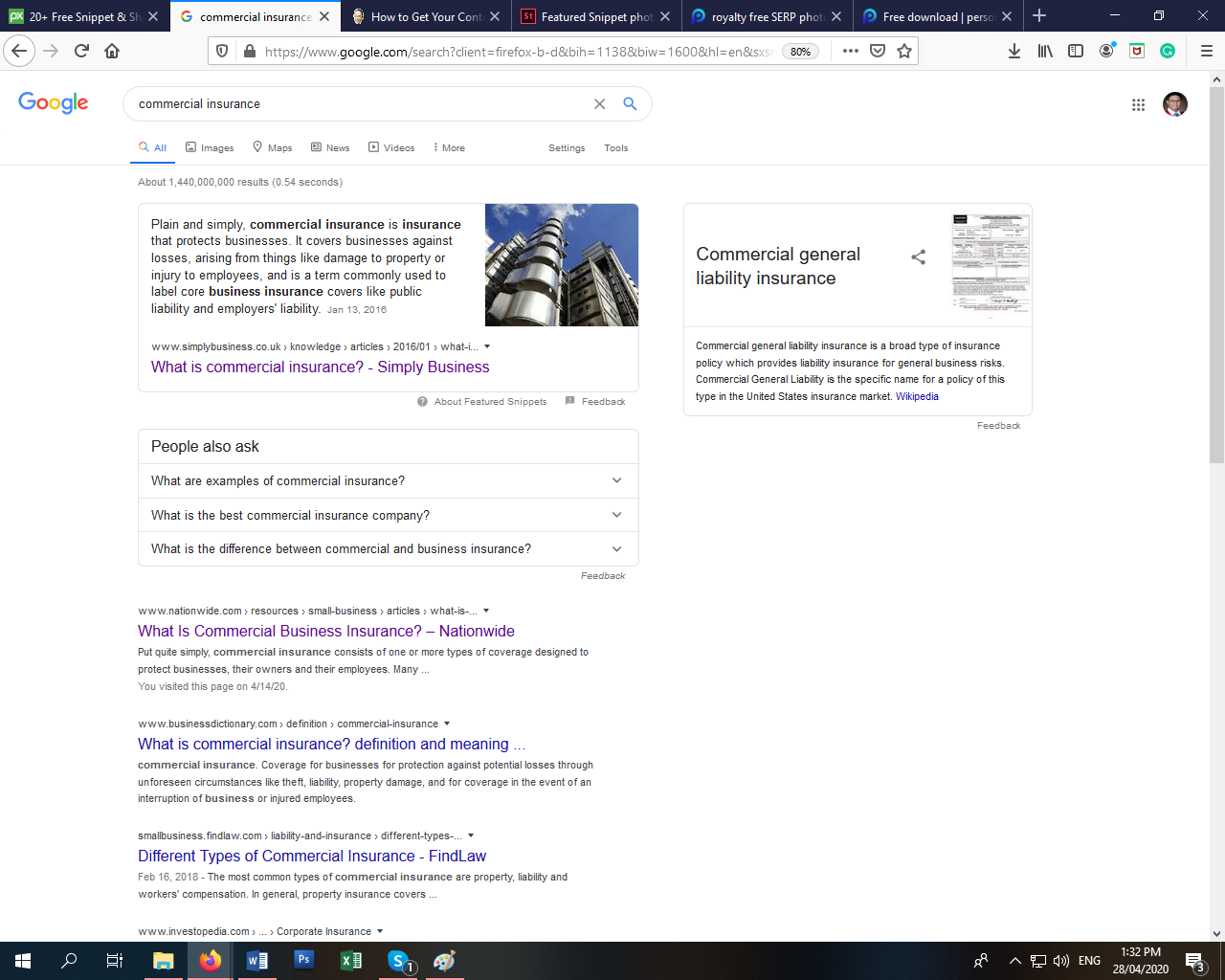
In this example, a user looked for the meaning of commercial insurance. The featured snippet provided quick information about the searched query. The result provided an explanation in paragraph form. Also, the very nature of featured snippet, it provides a link to a website where users can explore more about the information.
3. Bulleted list

Bulleted list snippet appears when the research query is related to list, ranked and unranked items, and feature lists. Based on the example, the user searched for iPhone models. SERP displays the results including a bulleted list snippet showing the different models of iPhones.
4. Table featured

The table featured snippets are usually displayed when users tend to look for pricing, lists, rates, and data. For example, a user searched for the price list for luxury cars. The SERP displays tabled feature snippets in search results. The table snippet contains the tabular presentation of car models, retail prices, and fuel consumption. Also, like other types of snippets, table feature snippets also include landing websites where the table is published.
5. YouTube featured
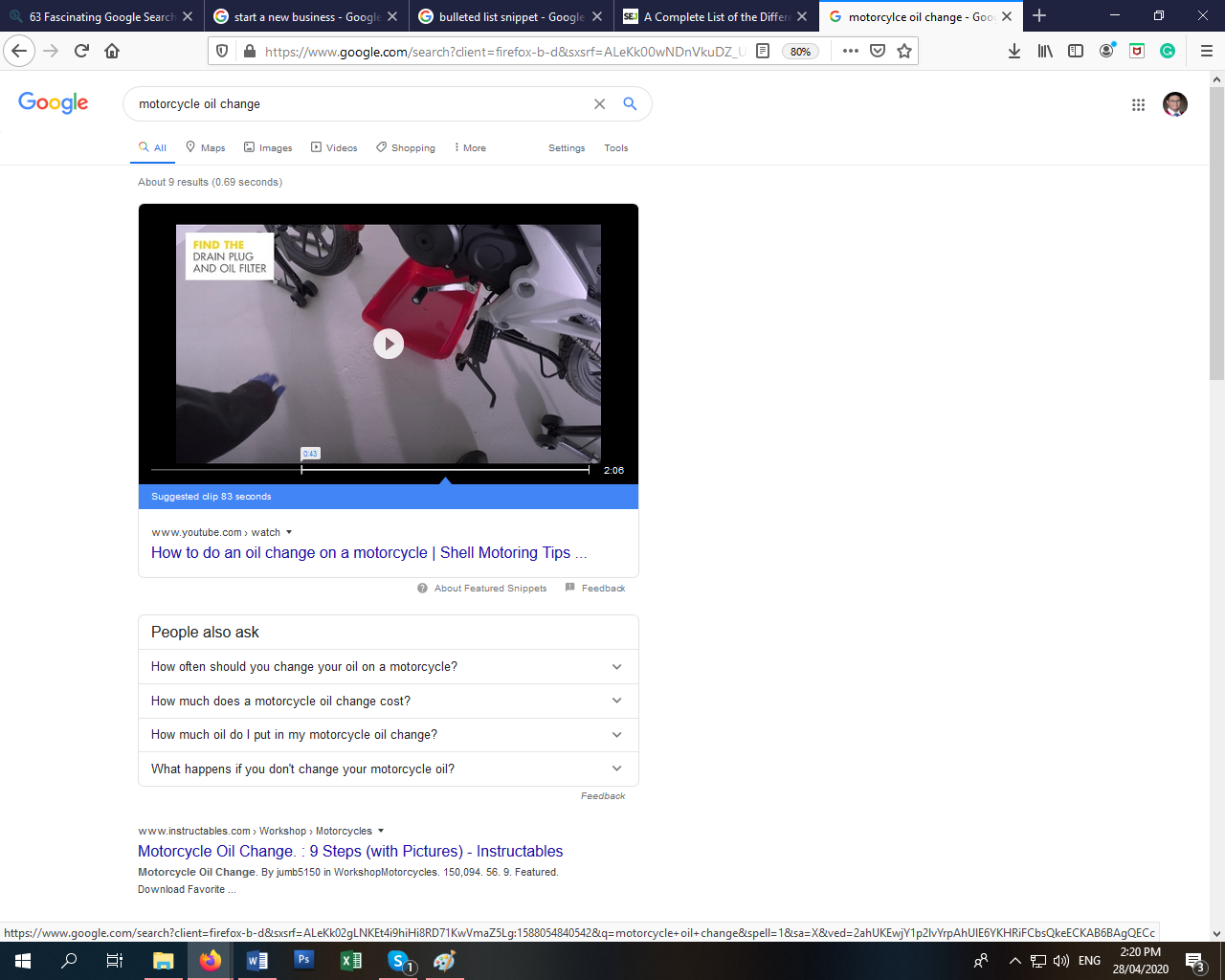
Thanks to Google Video Intelligence API that can decode video content. It can identify objects in the video and match them with related keywords. Here, the tool jumped into the timestamp where the searched content can be seen.
Here, the user tried to look for the procedures on how to perform an oil change on a motorcycle. The SERP included in the set of results the YouTube featured snippet.
YouTube featured snippets can appear for any type of search query. It is included when the illustration is best via video.
There are other search results that look like a featured snippet. How can we tell that it is not a featured snippet? The main characteristic of a featured snippet is that Google attributes the result to any particular website.
Rich answers
Rich answers may look like snippets. But technically, it is not a snippet. It is a quick answer in SERP.
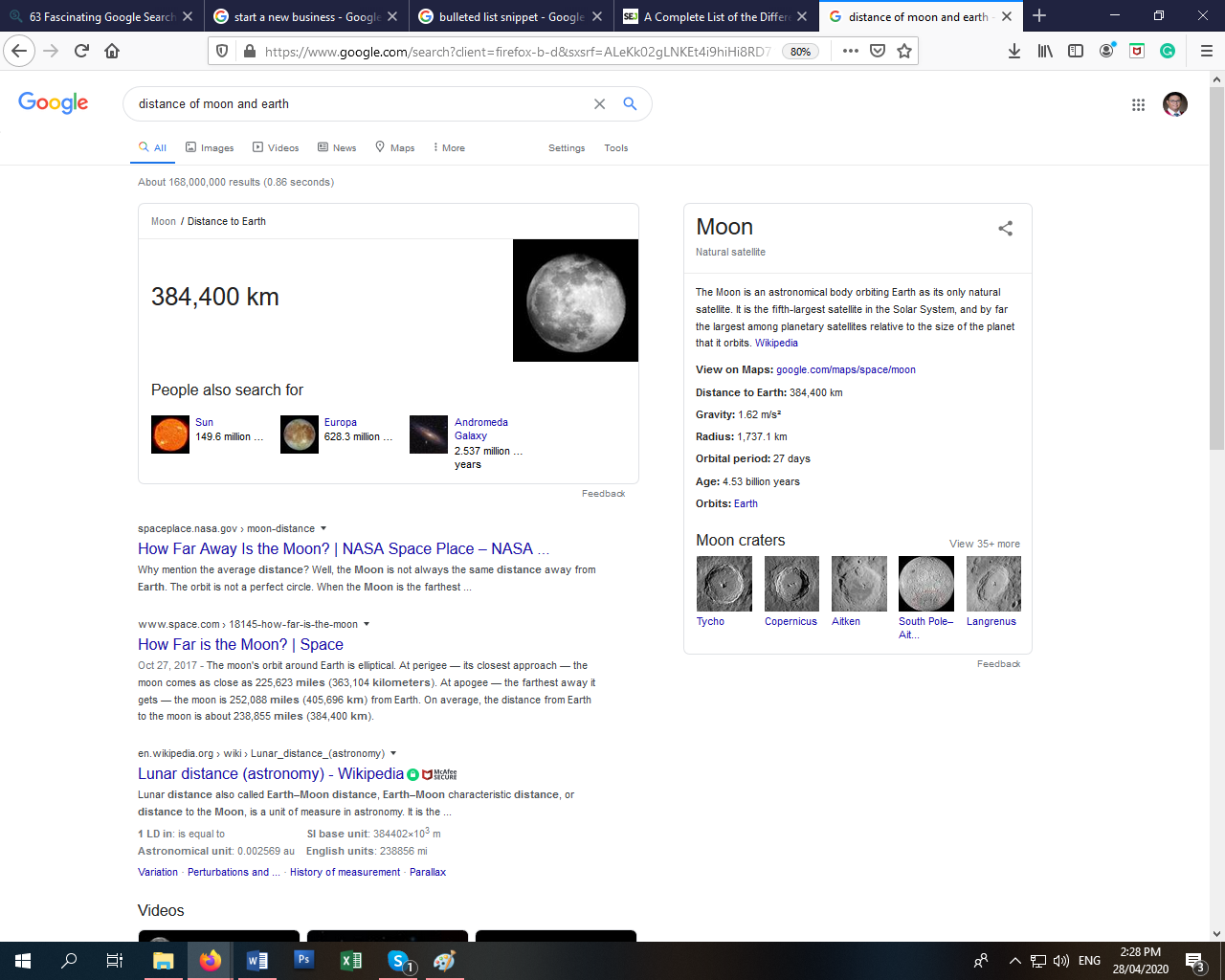
For example, a user searched for the distance of Earth from its moon. The SERP provides results including rich answers. Rich answers may look like snippets. As seen in the picture, it is also featured at the top of the results.
Rich answers do not have links to a landing website, unlike snippets. That makes it different from snippets.
Knowledge graphs
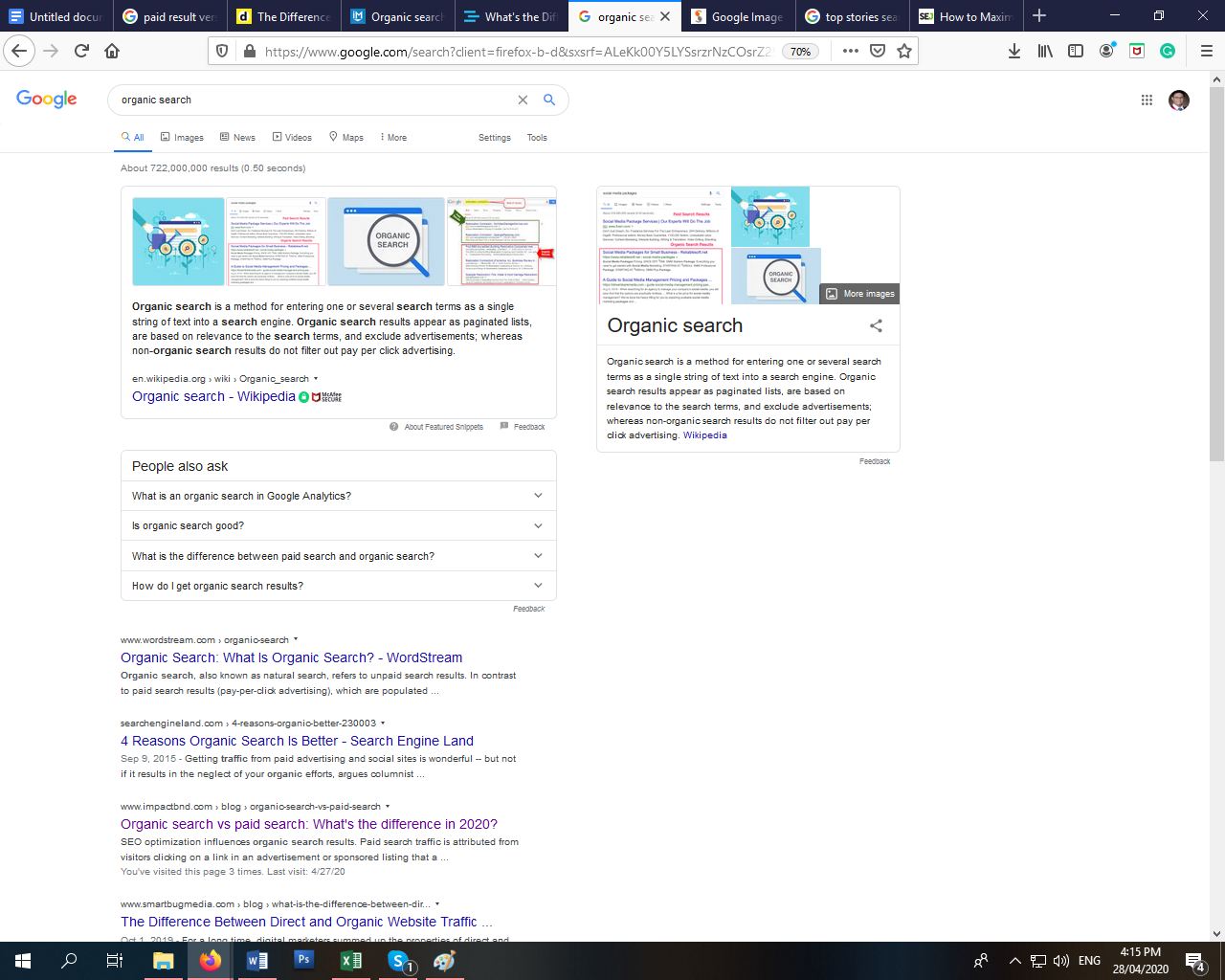
While other results rely on keywords, knowledge gaps try to anticipate what the users are looking for. To make it more vivid, Google understands the keywords semantically instead of literally displaying results. This results in a more intelligent answer to a query.
Knowledge graph panels are giving users relevant information without clicking a link. Also, it gives digital marketers a chance to enhance their visibility.
There is a dilemma between knowledge graphs and rich results. The main distinction between these two is determined by its accessibility of content. Rich results provide users limited control over the content while in knowledge graphs, users can suggest changes.
Video Results

SERPs are displaying more content through videos. In the world of the internet, videos are the most inviting content. Statistics show that 55% of people watch videos every single day.
As the algorithm of SERP advances, it can also suggest clips from videos. The special feature of this result is that it can jump into the timestamp where the content can be watched. SERP does not only display video results, but it can also jump into a specific timestamp where the content searched is featured.
Google tends to give preference to landing pages with video content. Having video content on your website can exploit the dwell time ranking boost that Google uses to rank web pages.
Image search results
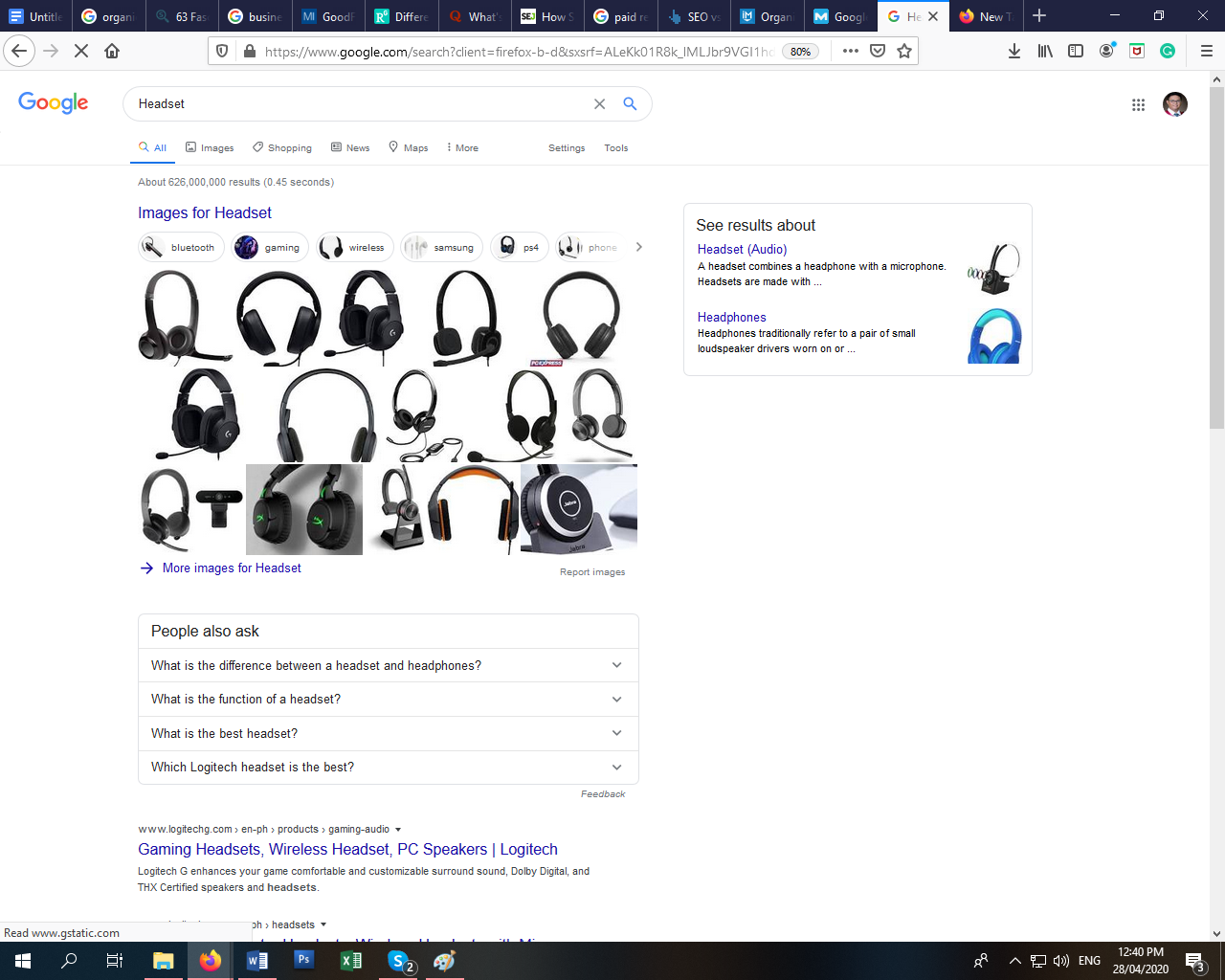
The image search results are generated from relevant keywords where images can make sense. The results link the users to different related images.
For example, if a user looks for a headset, the SERP will display images of various headsets. The SERP associates the keyword searched to related images matching it.
People also ask
This is a new feature in SERP that is usually located in the middle. Upon clicking one of the frequently asked questions, search engines will expand consisting of an answer to the query.
Search engines list questions related to the searched terms. The answers that expand from the questions are from blog posts, videos, and podcasts.
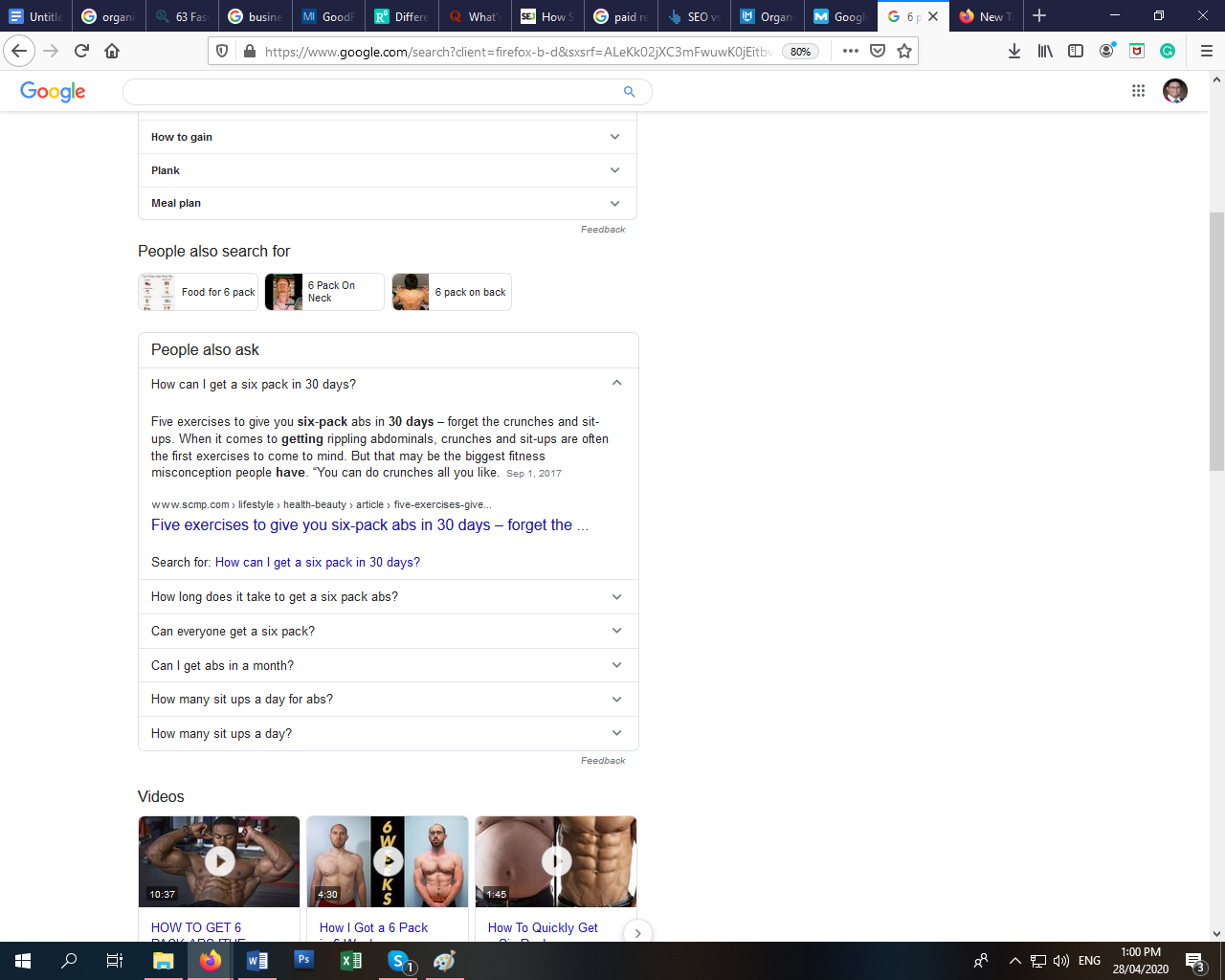
For example, a user searched for “how to achieve 6-pack abs”. People also ask a portion of SERP to indicate the frequently asked questions based on the recent searches done by other users.
If a user clicks one of the questions, the selection will expand and display the most relevant answer to the question.
Top stories
This SERP features news articles on a certain topic. Searching for trending keywords is not the only way to generate top story results. Even if the search volume of a certain topic is stable, SERP will always display the Top Stories section.

Top stories section will not appear in all searches. In this example, the user looks for “overcoming fear”. The SERP includes the results of the top stories. The top stories included are videos from different websites that are relevant to the searched keyword.
Top stories also provide other stories aside from the displayed links. This feature offers websites the opportunity to gather clicks aside from organic and paid search results.
Shopping results
Not all shopping results are advertisements. Organic search results include shopping results and it is located usually at the top of paid results.
The SERP displays shopping results based on the user’s location. This implies that the results are dependent on the location where the search was made. The result may show nearby areas or local online selling platforms.
Bottom line
To sum up, the Search Engine Results Page (SERP) is the process taken by search engines to display results. SERP has the following features: featured snippets, rich answers, paid results, people also ask, image result, video result, top stories, and shopping results.
SERP may not be an important idea for most people, but it holds great importance for digital marketers. Understanding what SERP is and how it works, can help generate strategies to initiate more conversions.
Did you like the article? Let me know in the comments below.
To further explore ideas related to SERP, read these articles
- Tips to increase your subscriber count on YouTube
- All about Facebook marketplace
- Understanding Google analytics
How SERPs works in AI search engines (ChatGPT, Perplexity, Google AI Overviews, Claude)
An AI Overview is now the first thing many users see for how-to and informational queries. It cites 3-7 sources directly underneath, and a click on a citation counts as a referral in your analytics. So ‘ranking on the SERP’ in 2026 means two things: ranking high enough in classic results to be considered as an AI Overview source, and being structured cleanly enough that the LLM can lift an answer from your page.
What gets you cited inside the AI Overview surface: a concise TL;DR at the top of the page, schema markup (Article + FAQPage + HowTo), an FAQ section using literal user-question phrasing, and primary-source citations linking to the AI providers themselves. Pages that already rank in the top 5 organically and have those structural moves get cited disproportionately often.
The 4-block GEO scaffold for SERPs
- Lead with a TL;DR. 2-4 sentences at the top of the post that answer the head query directly. AI Overviews and Perplexity preferentially cite this block.
- Add a numbered step-by-step section. Generative engines extract clean ordered lists into their answers more reliably than prose.
- Close with an FAQ. Use the literal phrasing of questions people actually ask in your niche; mark up with FAQPage schema.
- Cite primary sources. Link to Google’s own AI Overviews documentation, OpenAI’s structured-data guidance, and Anthropic’s content-quality posts. LLMs trust pages that cite the model providers themselves.
Internal reading on AI SEO + GEO
If you’re building this into your stack, also read: the full SEO guide for 2026, the schema markup tutorial, 11 on-page SEO tips, 17 white-hat SEO techniques.
FAQ — SERPs in the AI search era
Are AI Overviews replacing the classic SERP?
Not replacing — layering on top. Classic organic results still appear underneath the AI Overview block; many users scroll past it. The AI Overview is an additional surface, not a substitute, and being cited in it is a separate visibility goal from ranking organically.
Do AI Overviews send less traffic than #1 organic?
Per click, yes — the click-through rate on an AI Overview citation is lower than #1 organic. But the citations are higher-intent (users in research mode) and the surface is new enough that most competitors aren’t optimizing for it. Net effect for early movers is positive in my logs.
How do I check whether my page is being cited in an AI Overview?
Manual sampling for now: query your head terms in Google AI Overviews and Perplexity weekly, log the citations. Tools like Profound and Athena are starting to automate AI-Overview tracking; rank trackers from Ahrefs and SEMrush are adding it too in 2026.
Where I’d take this next
If you operate inside any of the loops above, I build custom AI agent systems that automate them. The whole site you’re reading is one — here’s the stack.
What changed in 2026
SEO in 2026 is unrecognizable from the 2020-era playbook. Three shifts that matter for anything written before mid-2024:
- AI Overviews are the new SERP zero position. Google’s AI Overviews default to roughly 60% of US informational queries, eating most “what is” / “how to” CTR. Optimizing for citation inside the AI Overview is now as important as ranking #1.
- GEO (Generative Engine Optimization) is the working term for cross-engine optimization — getting cited inside ChatGPT, Perplexity, Claude, and Gemini answers. ~12% of high-intent commercial queries in late 2025 sample studies showed a direct-citation flow from these engines (vs. zero pre-2023).
- E-E-A-T (now E^3-A-T, Experience + Expertise + Establishment + Authoritativeness + Trustworthiness) continues to be the framing Google uses internally — “Establishment” was the 2024 addition emphasizing brand-level signals.
Tool landscape (2026): Ahrefs and Semrush both shipped Generative Engine tracking. Surfer SEO + the Topical Authority crowd added GEO scoring. Screaming Frog still the standard crawler. AlsoAsked, Keyword Insights, and Frase shifted heavily into AI-Overview snippet engineering.
If this post predates May 2024, treat its core advice as the Google-search baseline and layer the GEO playbook on top.
Every Wednesday. 28,400+ operators. Zero fluff.
✓ Check your inbox — click the confirmation link to complete sign-up.
✓ You're subscribed!
✓ You're already on the list.
Related posts
Why Your Best-Ranking Pages Get Zero Clicks
I pulled my own Search Console data and found a page ranking position 8.9 with a 0.07% CTR. Here's what was actually wrong, and how I'd fix it.
GEOGEO for Multilingual Sites: Getting Cited in Every Language
Running GEO on a site that publishes in 13 languages taught me hreflang, llms.txt, and schema all behave differently than English-only advice assumes.
GEOHow to Add GEO to an Existing SEO Retainer
How an SEO agency adds real GEO work to an existing retainer — audit first, price it as its own line, and avoid relabeling the same deliverables.
Get the AI playbook in your inbox
Every Wednesday. 28,400+ operators. Zero fluff.
Check your inbox.
We sent you a confirmation email — click the link inside to complete your subscription. Check spam if you don't see it within a minute.
You're subscribed.
Welcome — the next edition lands in your inbox soon.
You're already on the list — look for it every Wednesday.